
Printing, Copying & Scanning
The J.D. Williams Library provides printing, copying, and scanning services for students, faculty, and visitors. Whether you need to print a paper, scan a document, or make copies, we’ve got you covered.
Printing, Copying & Scanning
We have a number of printers, copiers and scanners throughout the Libraries. All library users, regardless of University affiliation are welcome to use library printers, copiers and scanners.
Print Locations
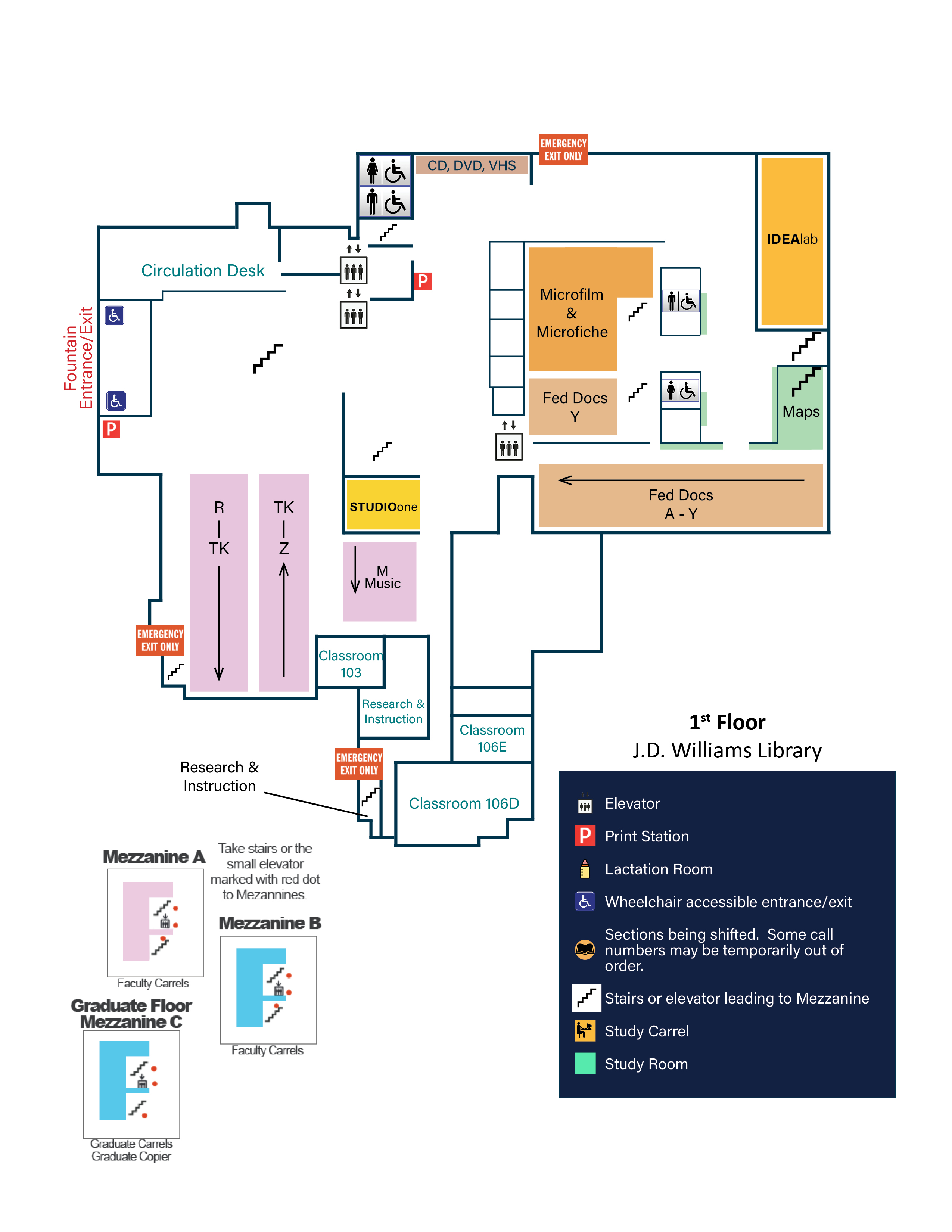
First Floor Map Description – J.D. Williams Library
The first floor of the J.D. Williams Library at Ole Miss. The entrance/exit by the fountain is on the upper left side of the map.
Once you enter the fountain entrance, to your left is the Circulation Desk, and to the right around a corner is a print station. Slightly past the Circulation Desk to the left are the elevators.
Moving further inside, in front of the fountain entrance are the central stairs. To the right of those stairs are multiple tables and chairs for student use. Behind those tables are several bookshelves in two horizontal rows that cover R to TK and TK to Z. A hallway runs vertically along the first row of shelves and ends in emergency exit–only stairs. Another hallway runs vertically along the last row of shelves, includes study carrels, and leads to Classroom 103.
Directly past the central stairs are carrels and seating chairs. Beyond those is a wall with two openings leading to a different section of the floor called Commons.
From the Commons entrance to the right, there is a stairwell, then Studio One, followed by shelves labeled M (Music). Past these, one hallway continues forward to several classrooms and offices, while another hallway goes to the right, returning to the TK to Z bookshelves. The forward hallway includes Research & Instruction offices, Classroom 106E on the left, and Classroom 106D at the end. Next to Classroom 106D is another Research & Instruction office, followed by an emergency exit–only area.
From the Commons entrance to the left is another printing station at the Reference Desk. To the left of the Reference Desk is a wall with two openings leading to a hallway with a stairwell and an accessible restroom. Outside of this hallway are storage bins for CDs, DVDs, and VHS. The rest of the Commons section includes tables, chairs, and computer workstations.
Across from the restrooms and the CD, DVD, and VHS area is the final section of the floor. Entering from the Commons section to the left is an emergency exit–only door. This area contains several tables and chairs, and on the far wall is the Idea Lab. Facing the Idea Lab and to the right is an area for various materials. On the right side are accessible restrooms with a hallway between them leading to the Microfilm & Microfiche section and the Federal Documents Y section. Within these sections are stairs that provide access to the mezzanines. On the left side of this area are stairs and the Maps section, and at the end is the Federal Documents A through Y collection.
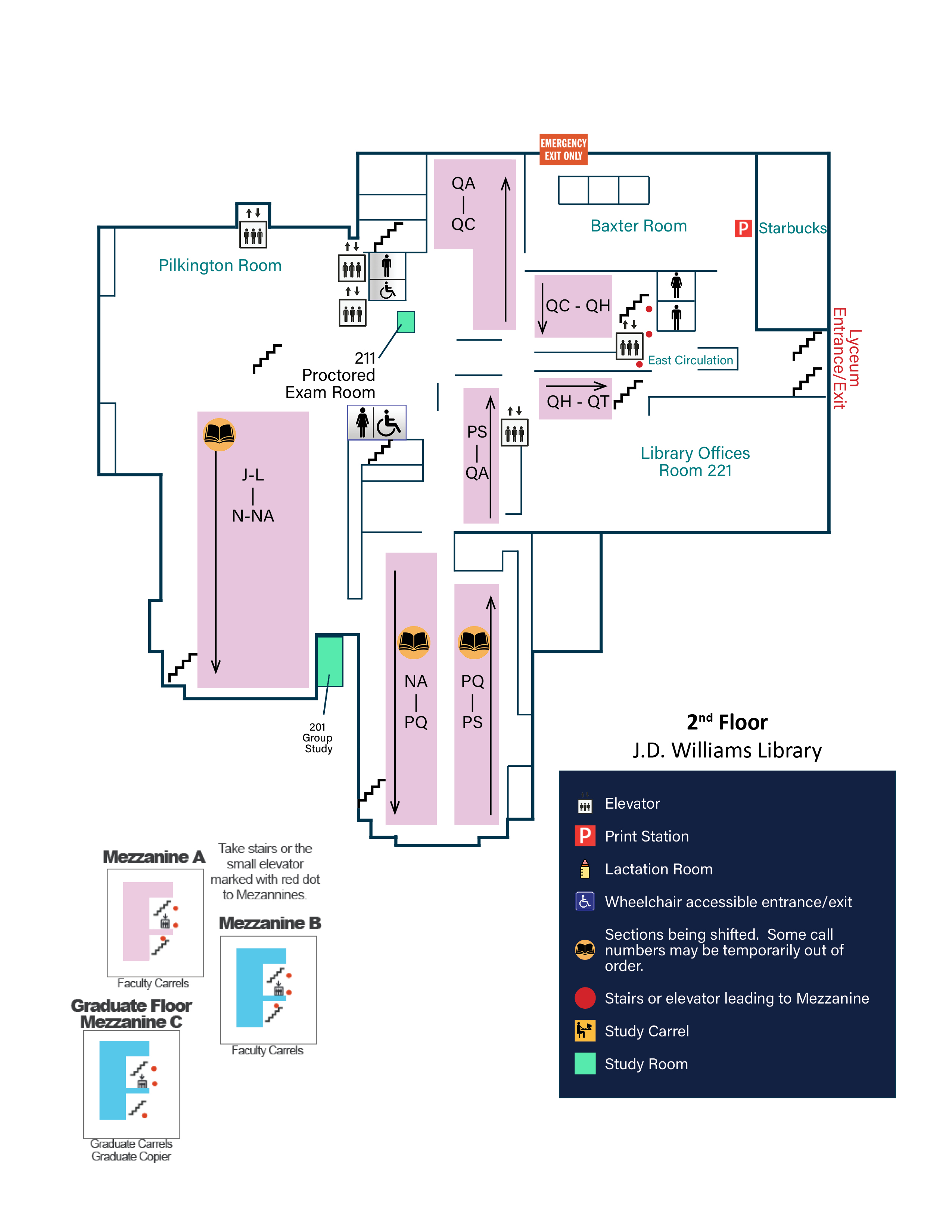
Second Floor Map Description – J.D. Williams Library
The Lyceum entrance/exit is shown on the right side of the map, with stairs going down to your left as you enter and stairs going up to your right.Upon entering, Starbucks is on the right and Library Offices (Room 221) are on the left. Directly in front of the entrance is the East Circulation Desk. To the right of the East Circulation Desk are restrooms, and further to the right is Baxter Room. Baxter Room connects to Starbucks and includes tables and chairs for student use. A printing station is located in the corner shared with Starbucks. An emergency exit is located near the far corner of Baxter Room.
Stairwells are located behind the East Circulation Desk to both the left and right. These stairwells provide access to the mezzanines.
A long hallway extends from behind the East Circulation Desk to an area with an accessible women’s restroom on the left and an accessible men’s restroom on the right. Stairwells are located next to each restroom, and elevators are located around the corner from the men’s accessible restroom. Along this hallway are several openings to book stacks, with QC through QH on the right and QH through QT on the left.
Across from the women’s accessible restroom are shelves for PS through QA, with an elevator located beyond them. A hallway from this area leads left to shelves for NA through PS and PQ through PS. Near the men’s accessible restroom on the right are shelves for QA through QC. Room 211, a proctored exam room, is also near the men’s bathroom.
Past the accessible restrooms are the central stairs. To the right is the Pilkington Room, and to the left are two horizontal rows of shelves for J through L and N through NA. The Pilkington Room contains several tables and chairs, along with an elevator on the right wall.
Three long hallways run around the shelves to the left of the central stairs: one at the top of the rows, one in the middle, and one at the end. Along the hallway at the top of the shelves are tables and chairs, and at the end is the 201 Group Study Room. The hallway at the end of the shelves includes study carrels and ends at a stairwell.
Costs
-
Poster Printing
Print professional-quality posters at the IDEAlab with fast turnaround and affordable pricing. Submit your PDF or PNG file online and choose from standard or custom sizes up to 42 inches wide.
Print a Poster -
3D Printing
Print your 3D designs at the IDEAlab Makerspace, available to Ole Miss students, faculty and staff. Upload your file, get a custom quote, and bring your ideas to life.
Print in 3D